How to Read Printer Page Yield and Cost Per Page
A cartridge yield is a figure from a standardised test, and it only becomes useful once you divide the cartridge price by it. Here is that arithmetic on current Brother and Epson pages.
This article is a documentation review: it is based on the vendors' own published pages, checked on the date shown. We may earn a commission from some links; it never affects what we recommend.
Printer page yield is the most useful number on a supplies page and the least often divided. It is a declared figure from a standardised test, not a count of the pages you will print. Turned into cents per page it decides the real cost of owning the printer, usually several times the purchase price. This guide reads current yields and prices from Brother and Epson, does the division, and names what the pages leave out. Every figure comes from the makers' own pages, checked October 11, 2026, with our arithmetic marked as editorial.
The yield is a declared test figure, not a count of your pages
Brother states the basis in a footnote on every toner page: "Approx. toner cartridge yields in accordance with ISO/IEC 19752 (Letter/A4)". That is a published standard with a fixed test document, so two brands citing it can be compared with each other.
What the pages do not do is reproduce the test. None of the Brother or Epson pages read for this guide states the page coverage the standard assumes, so a buyer cannot tell how their own documents compare with the test document.
That matters because coverage drives consumption. A page of dense tables uses more toner than a page of double-spaced text, and the declared yield describes neither of them specifically. Treat the yield as a comparison unit between cartridges rather than a forecast.
This is the same reading applied to appliance capacity, where a number is only meaningful with its test condition attached. The worked version is in what dehumidifier pint ratings actually mean.
Divide the cartridge price by its yield before anything else
Take one current mono laser. The Brother HL-L2460DW is listed at $179.99 with a "1 Year Limited" warranty and a maximum print speed of 36 ppm. The box includes a starter cartridge rated at 700 pages.
Its standard replacement is the TN830, which "Yields approx. 1,200 pages" at $60.99. By editorial calculation that is 5.1 cents per page for toner alone, before paper, power or the drum.
Run the same division on the printer and the picture is stark. By editorial calculation the $179.99 printer costs less than four standard cartridges, so the machine is cheaper than its first 5,000 pages of toner.
So the number to compare across models is cents per page from the cartridge the printer takes, a figure almost no listing publishes for you.
The high-yield cartridge is usually the cheaper one per page
The same printer takes a larger cartridge. The TN830XL "Prints up to 3,000 pages" at $98.29, under the same ISO/IEC 19752 footnote. By editorial calculation that is 3.3 cents per page.
The high-yield version therefore costs 61 percent more to buy and about 35 percent less per page, by editorial calculation. Over 3,000 pages the saving is roughly $54 against buying two and a half standard cartridges.
The catch is cash flow and shelf life rather than arithmetic. A household printing 200 pages a year will take fifteen years to finish a 3,000-page cartridge, and neither Brother page states a shelf life for unopened toner.
- TN830 standard: 1,200 pages at $60.99, about 5.1 cents per page.
- TN830XL high yield: 3,000 pages at $98.29, about 3.3 cents per page.
- In-box starter cartridge: 700 pages, no separate price.
- DR830 drum: 15,000 pages, "based on 1 page per job", no price on the printer page.
- All three toner figures carry the ISO/IEC 19752 footnote.
Those four rows are a complete running-cost picture except for the drum price, which the printer page omits. Ask for it before buying, because a laser printer needs a new drum roughly every five high-yield cartridges by editorial calculation.
Ink and toner are measured by different standards
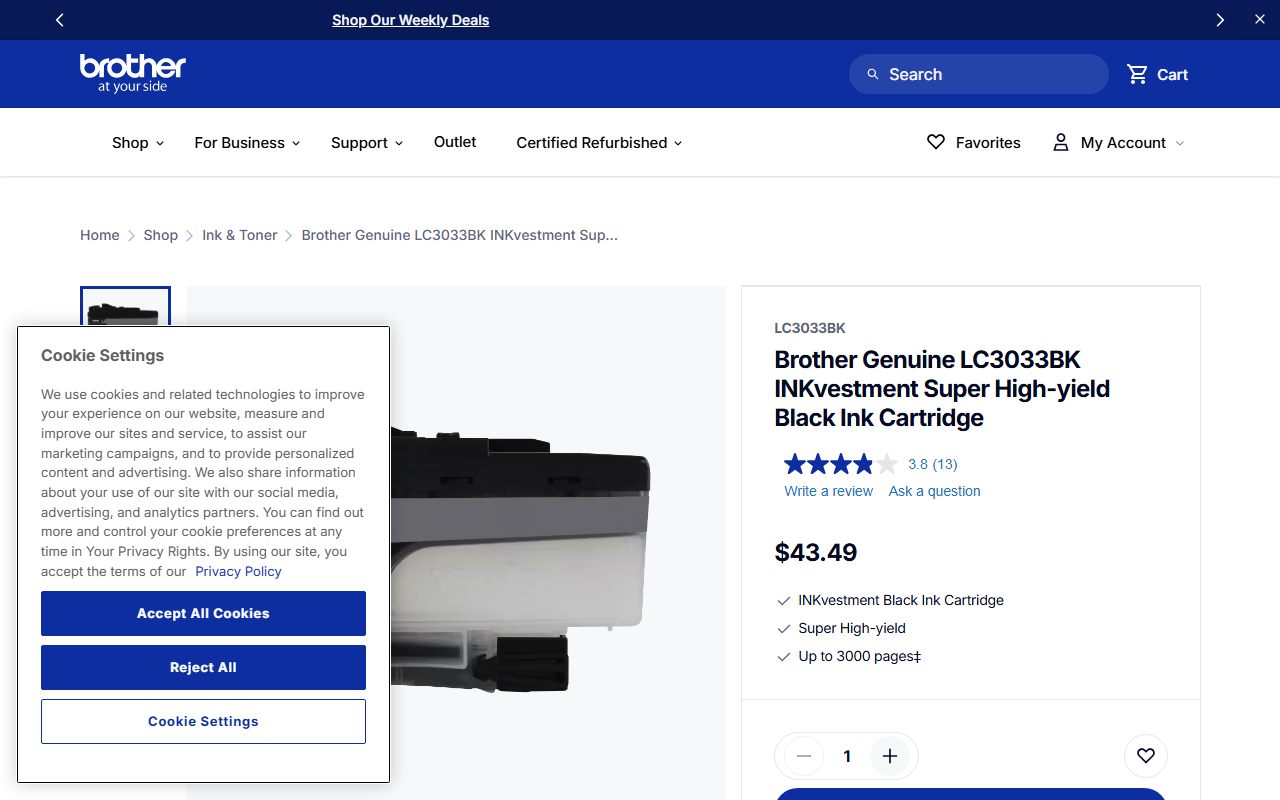
A yield figure is only comparable within its standard. Brother's ink cartridges carry a different footnote: the LC3033BK is rated "Up to 3000 pages" under "ISO/IEC 24711 (letter/A4)" at $43.49.
By editorial calculation that is 1.4 cents per page for black ink, which looks cheaper than the laser. The comparison is not clean: 24711 and 19752 are separate test methods, and a colour inkjet also consumes the colour cartridges during maintenance.
Epson names a third standard. Its EcoTank page credits the "ISO/IEC 24712 pattern with Epson's methodology", which is the colour test suite rather than a yield method. Noting which standard a number came from is part of reading it.
Compare laser with laser and inkjet with inkjet, using the same standard on both sides. A cross-standard comparison is the printing version of comparing two BTU figures from different procedures, as in SACC vs ASHRAE BTU on a portable AC spec sheet.
A tank printer moves the cost, and dates its own claim
Refillable tanks change where the money sits. The Epson EcoTank ET-2850 is listed at $349.99, with replacement T502 bottles rated at 7,500 pages black and 6,000 pages for each colour.
The headline saving claim comes with its own basis. Epson states buyers "Save up to 90% with replacement ink bottles vs. ink cartridges", calculated from the cost of bottles against enough standard cartridges, using MSRP and yields "as of March 2024".
That date is worth noticing. The claim on the page read in October 2026 rests on prices more than two years old, and the page itself adds that "Actual savings and costs will vary considerably based on print tasks, print volumes and usage conditions".
The page read for this guide lists the bottle yields but no bottle price, so a cents-per-page figure cannot be computed from it. Epson also warns that "Yields are lower when printing infrequently or predominantly with one ink color".
A dated claim is still better than an undated one. A maker that tells you when the arithmetic was run has given you something to check, which is more than most coverage claims manage in how to read a scent diffuser spec sheet.
Read the drum, the duty cycle and the recommended volume
Three more numbers on the Brother printer page change the answer. The included DR830 drum is rated at "15,000 pages" with the qualifier "based on 1 page per job", which is a best case for a drum because every job spins it up.
The second is the maximum monthly duty cycle, listed at up to 35,000 pages. The third is the recommended monthly print volume, listed at up to 2,500. The gap between them is a factor of fourteen.
Buy against the recommended figure, not the duty cycle. The duty cycle is what the mechanism can survive; the recommended volume is what the maker expects it to do month after month inside a one-year warranty.
A headline maximum sitting far above the sustained figure is the oldest shape in spec sheets, and it behaves exactly like the summed band rates in what router speed numbers actually mean.
Frequently asked questions
What does ISO page yield mean on a toner cartridge?
It means the yield was declared under a published standard, ISO/IEC 19752 for mono toner, so cartridges can be compared with each other. Brother prints that footnote on its toner pages as of October 2026, but does not publish the coverage the test assumes.
How do I work out cost per page?
Divide the cartridge price by its declared yield. A Brother TN830 at $60.99 for 1,200 pages is 5.1 cents per page by editorial calculation; the TN830XL at $98.29 for 3,000 pages is 3.3 cents. Add paper, power and the drum separately.
Is a high-yield cartridge worth the extra money?
On these two, yes if you print enough. The XL costs 61 percent more and runs about 35 percent cheaper per page by editorial calculation. A low-volume household may not finish a 3,000-page cartridge, and Brother states no shelf life for unopened toner.
Can I compare an inkjet yield with a laser yield?
Not directly. Brother cites ISO/IEC 19752 for toner and ISO/IEC 24711 for ink, which are separate test methods. Epson cites the ISO/IEC 24712 colour pattern with its own methodology. Compare within one standard at a time.
Are EcoTank printers really 90 percent cheaper to run?
Epson claims "up to 90%" against cartridges, calculated from MSRP and yields "as of March 2024" per its ET-2850 page. The same page says actual savings vary considerably. The page read in October 2026 lists bottle yields but no bottle price.
Bottom line
A complete printer supplies page states the yield, the standard behind it, the cartridge price, the drum yield and price, and the recommended monthly volume. Brother publishes four of those five; the drum price is missing from the printer page.
Do the division before buying the hardware, compare within one standard, and check the date on any savings claim. A figure with its test condition attached beats a bigger figure without one, the lesson of how to read an air purifier spec sheet.
Where one advertised total quietly divides between what you actually plug in, the behaviour is the same as in what a USB-C charger's wattage rating means.
Sources
- Brother HL-L2460DW printer product page (price, speed, drum, duty cycle) (checked Oct 11, 2026)
- Brother TN830 standard yield toner page (1,200 pages, ISO/IEC 19752) (checked Oct 11, 2026)
- Brother TN830XL high yield toner page (3,000 pages, ISO/IEC 19752) (checked Oct 11, 2026)
- Brother LC3033BK ink cartridge page (3,000 pages, ISO/IEC 24711) (checked Oct 11, 2026)
- Epson EcoTank ET-2850 product page (bottle yields, savings claim basis) (checked Oct 11, 2026)